Operations automation
Turn recurring work into areliable operating rhythm
Automate collection, aggregation, reporting, alerts and approval so your team can focus on the decisions that matter.
No credit card required
SCHEDULEPROCESSREPORTAPPROVE

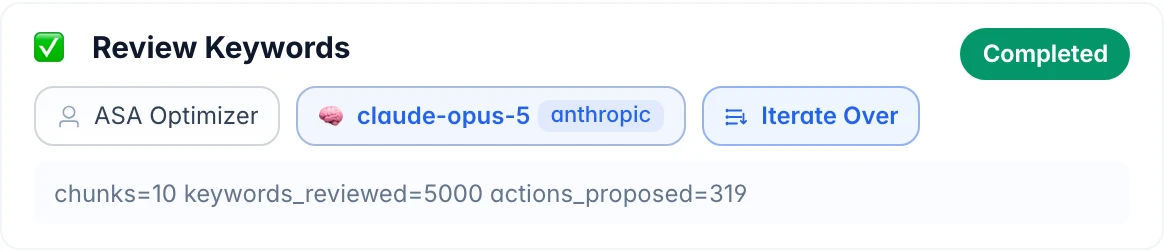



Done in 13m36s · usage and cost on the record
How it runs 8
One flow from orchestration to delivery
A repeatable run replaces a fragile checklist. Execution analytics and run history make recurring operations observable.
Browse all services01Orchestration & processing
Google Sheets
Microsoft SharePoint
Notion
Google Drive
BraidrunArrange
- 01Daily scheduleSCHEDULE
- 02Collect source dataPROCESS
- 03Aggregate and analyzeREPORT
- 04Owner approvalAPPROVE
Every Step Is TraceableDIFF ✓
03Evidence & delivery
Slack
Telegram
SendGrid
Dropbox
Core capabilities
See how the workflow becomes operational
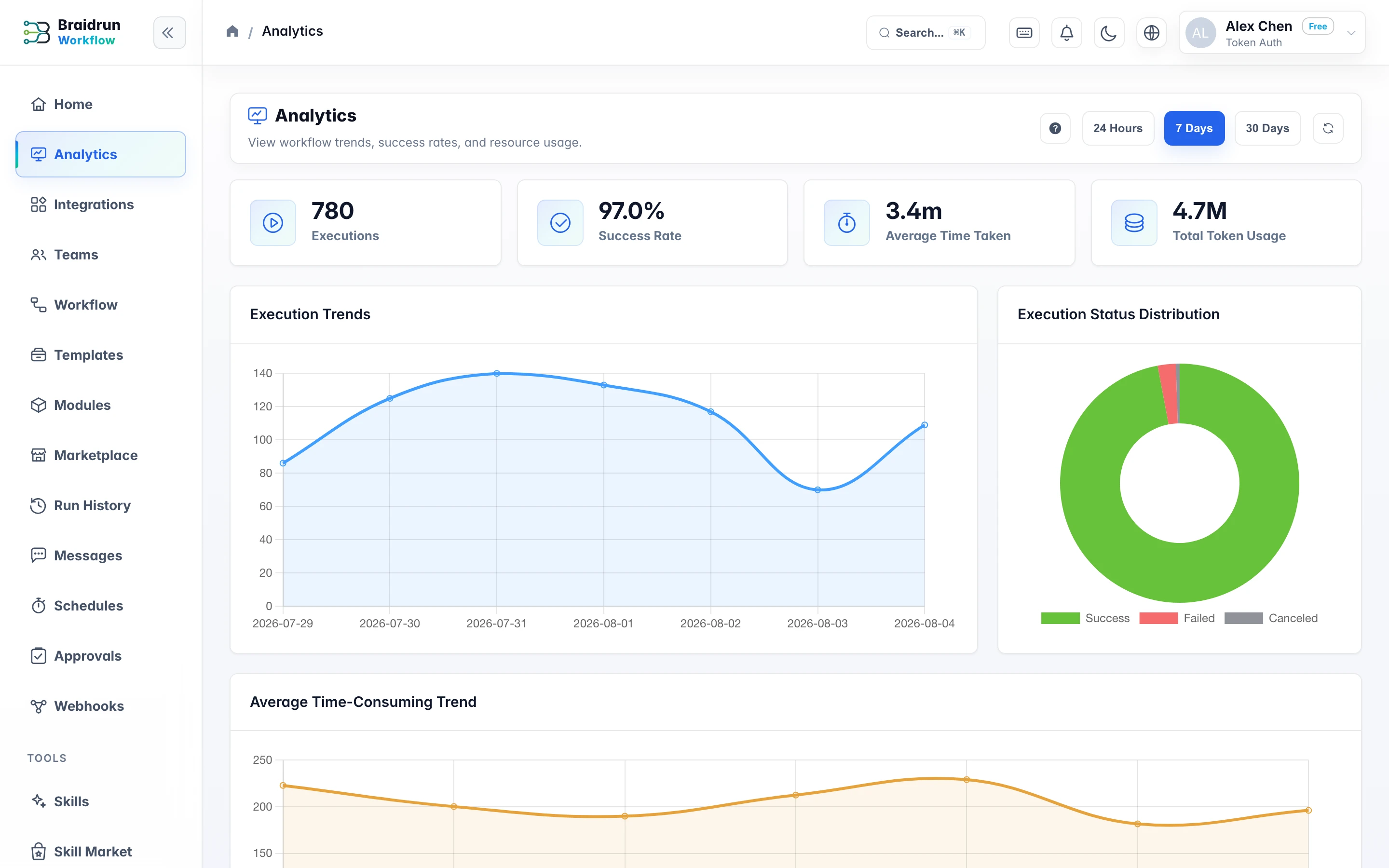
Execution analytics and run history make recurring operations observable.
Product proof
- 01Per-run status and duration
- 02Step-level output and errors
- 03Approval retained for sensitive delivery
The operational gap
Repetition hides the work that matters
Routine reporting consumes attention and creates avoidable handoff risk.
Copy-and-paste operations
People move the same data between systems and spreadsheets every day.
Reports arrive late
Collection and formatting delay the moment a team can make a decision.
Approval happens off-record
Reviews in chat or email are difficult to connect to the exact execution.
How it runs
From source systems to an approved report
A repeatable run replaces a fragile checklist.
- 1Daily schedule
- 2Collect source data
- 3Aggregate and analyze
- 4Owner approval
- 5Automatic delivery
Verified product scenario
Designed for real operating work
Routine reporting consumes attention and creates avoidable handoff risk.
Scheduled runs
Run daily, weekly or on a configured schedule.
SCHEDULEData processing
Collect, transform and aggregate inputs with modules or code steps.
PROCESSReports and alerts
Generate artifacts and surface errors or metric changes.
REPORTThe operational gap
Move from manual gaps to an accountable flow
Steps
Current approach
With Braidrun
Copy-and-paste operations
People move the same data between systems and spreadsheets every day.
Collect, transform and aggregate inputs with modules or code steps.
Reports arrive late
Collection and formatting delay the moment a team can make a decision.
Generate artifacts and surface errors or metric changes.
Approval happens off-record
Reviews in chat or email are difficult to connect to the exact execution.
Pause delivery until the responsible person approves.
Core capabilities
A dependable operating rhythm
Scheduled runs
Run daily, weekly or on a configured schedule.
Data processing
Collect, transform and aggregate inputs with modules or code steps.
Reports and alerts
Generate artifacts and surface errors or metric changes.
Human review
Pause delivery until the responsible person approves.
Product proof
See performance and failures in context
Execution analytics and run history make recurring operations observable.
- 01Per-run status and duration
- 02Step-level output and errors
- 03Approval retained for sensitive delivery
Reference workflow
Automated daily operations report
A scheduled run assembles data, calculates the report and pauses for an operations owner before distribution.
Before: an operator owns collection, spreadsheet cleanup and distribution.
After: the operator reviews one prepared result and handles exceptions.
Pricing
Start on the free tier
Free includes 5 workflows and unlimited AI assistant use (model costs use your credentials); upgrade to Pro for schedules, webhooks, and all 8 step types.
FreeExplore and learn, perfect for individuals$0
- 40 regular model requests per day
- AI Assistant
- 5 workflows
- 3 basic step types
- No credit card required
RecommendedProProductivity tools for individual developers$49/Month
- Unlimited regular model requests
- Access to advanced models
- 50 workflows
- All 8 step types
- AI assistant + debugger
TeamTeam collaboration and shared resources$99/Month
- Unlimited regular model requests
- Access to advanced models
- 200 workflows
- Includes 1 team seat
- Team management and collaboration
- Additional seats $9.9/seat/month
EnterpriseEnterprise-grade security and complianceContact Us
- Unlimited regular model requests
- Access to advanced models
- Unlimited workflows and steps
- Includes 1 team seat
- Team management and collaboration
- Additional seats $19.9/seat/month
- Audit logs and compliance
- SSO / SAML
FAQ
Questions, answered
Operations automation
Automate one recurring report today
Start with a process your team already knows and keep the owner in control.
Start freeNo credit card required